
Best Gaming Monitor 2026: 1080p, 1440p & OLED
IPS, VA, or OLED? Our 2026 gaming monitor guide picks the best panels at every budget and matches them to your GPU so you don't waste money.
PC HARDWAREBUILD COMPONENTSBUILD GUIDES
7/18/20266 min read
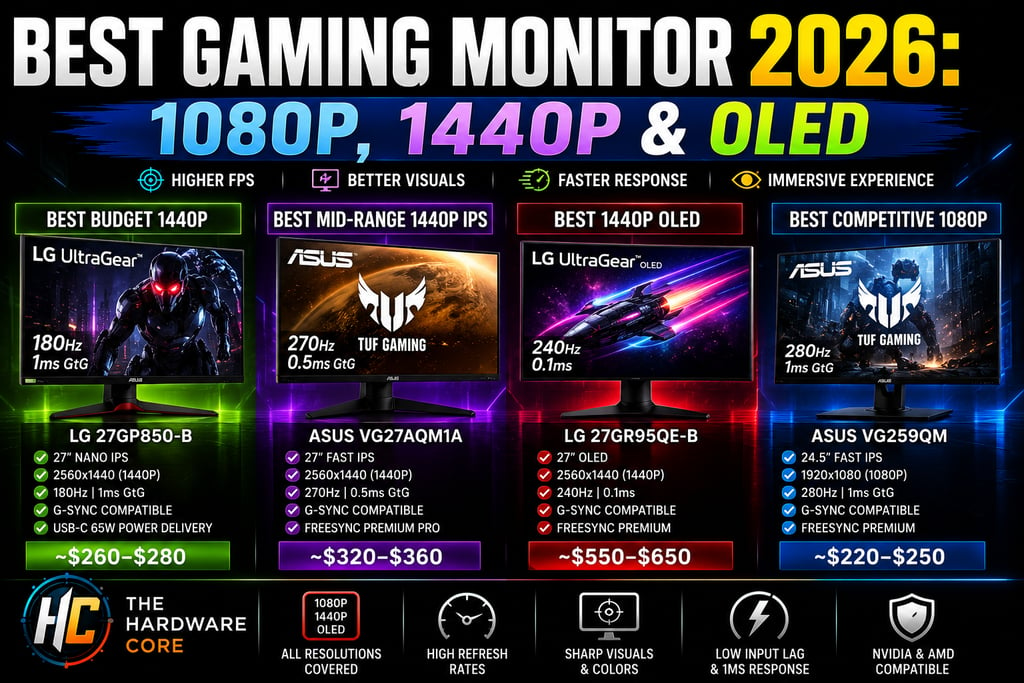
Best Gaming Monitor 2026: 1080p, 1440p, and OLED, What's Actually Worth Buying
This post contains affiliate links. If you purchase through these links, The Hardware Core may earn a small commission at no additional cost to you. This never influences our recommendations.
Your GPU renders the frames. Your monitor is where those frames actually become something you can see. Most people spend hours agonizing over their graphics card choice and then bolt it to a panel that bottlenecks the entire experience. A sluggish 60Hz monitor connected to an RTX 5070 Ti isn't a gaming setup, it's a waste of a thousand dollars.
The good news: 2026 is genuinely one of the best years to buy a gaming monitor. OLED has gone mainstream at prices that were unthinkable two years ago, 1440p panels at 144Hz and above are available for under three hundred dollars, and panel technology across IPS, VA, and OLED has matured enough that every tier offers real value. We break down the full picture in an upcoming video on The Hardware Core YouTube channel, this guide gives you the specific picks and the buying logic to go with them.
Match Your Monitor to Your GPU Before You Buy Anything
The single most common monitor buying mistake is choosing a resolution or refresh rate that your GPU can't actually feed. A 4K 144Hz panel connected to a mid-range graphics card runs at 4K 35 to 50 FPS in demanding titles. That's not 144Hz gaming, it's an expensive paperweight.
The pairing logic is straightforward once you apply it.
If you're running a budget GPU like the AMD Radeon RX 9060 XT or an Nvidia GeForce RTX 5060: Target 1080p at 144Hz or 1440p at 144Hz. These cards deliver smooth, playable framerates at both resolutions when expectations are calibrated to the hardware. A 240Hz 1440p panel doesn't make sense at this GPU tier, you won't consistently feed it.
If you're running a mid-range card like the Nvidia GeForce RTX 5070 or AMD Radeon RX 9070 XT: This is where 1440p at 165Hz to 240Hz becomes the sweet spot. These cards hold well above 144 FPS in most modern titles at 1440p, and a 240Hz panel puts that headroom to work rather than wasting it.
If you're running a flagship card like the Nvidia GeForce RTX 5070 Ti or RTX 5080: You've earned a 1440p 240Hz OLED or a 4K 144Hz panel. At this tier, 1080p is genuinely wasteful, the GPU is strong enough that resolution is the limiting factor, not frame output.
4K only makes real sense on screens 32 inches and larger, and only when your GPU can consistently deliver above 60 FPS at that resolution. Below that threshold, 1440p gives you sharper pixel density on a 27-inch screen than 4K on a screen that's too small to resolve the difference in a normal desktop viewing setup.
We paired the RX 9060 XT as the GPU recommendation in our best budget gaming PC build guide for 2026, if you're working from that parts list, a 1440p 144Hz IPS panel is exactly where your monitor budget belongs.
IPS vs VA vs OLED, Which Panel Technology Makes Sense in 2026
This is where most monitor guides bury the critical nuance. Panel type shapes how a monitor actually looks and feels to use, and the right choice depends entirely on what you play.
IPS, The Dependable All-Rounder
IPS panels offer the best balance of color accuracy, response time, and viewing angle for the money in 2026. Modern Fast IPS variants hit one millisecond grey-to-grey response times, which closes most of the competitive gap with older TN technology while delivering color that's actually worth looking at. If you spend time across AAA titles, competitive shooters, and general desktop use in equal measure, IPS is the safe default.
The downside is contrast. IPS panels typically hit around 1000:1 contrast ratio, which means dark scenes look grey rather than black. It's not a dealbreaker for bright, colorful games, it matters more in cinematic, atmospheric titles where deep shadows are part of the experience.
VA, The Contrast King on a Budget
VA panels deliver contrast ratios between 3000:1 and 6000:1, dramatically deeper blacks than IPS at the same price point. If you play dark atmospheric games like horror titles, space sims, or anything with heavy shadow work, VA's contrast advantage is genuinely visible and meaningful.
The catch is response time. VA panels can exhibit ghosting behind fast-moving objects in competitive shooters, particularly on cheaper units without advanced pixel overdrive. For primarily single-player gaming, VA is an excellent value. For competitive FPS at high refresh rates, IPS or OLED is the better call.
OLED, No Longer a Luxury
OLED is the headline story for gaming monitors in 2026. Each pixel generates its own light and switches off completely for black, delivering effectively infinite contrast, not the 6000:1 a good VA achieves, but actual infinite. Dark scenes look the way they were designed to look.
Response times are near-instant, around 0.1 milliseconds, making OLED the fastest panel technology available by a significant margin. Motion clarity in competitive shooters is visibly superior to even the best IPS panels.
Burn-in concerns are real but shrinking. Modern OLED gaming panels include pixel shifting, automatic brightness limiting, and panel refresh tools that make burn-in a non-issue for mixed gaming and desktop use under normal conditions. It becomes a concern with prolonged static content, HUD elements left on screen for hundreds of hours at full brightness. For most gamers this is entirely manageable.
The remaining legitimate reasons to skip OLED are budget constraints and very bright rooms. High-brightness LCD panels can get significantly brighter than current OLEDs in full-screen content, which matters in rooms with direct sunlight hitting the screen.
The Best Gaming Monitors at Every Budget
Here are the specific picks across the three major gaming tiers, based on 2026 real-world testing and current pricing.
Best Budget 1440p: LG UltraGear 27GP850-B
Panel: Nano IPS
Resolution: 2560x1440 (1440p)
Refresh Rate: 180Hz
Response Time: 1ms GtG
Sync: NVIDIA G-Sync Compatible and AMD FreeSync Premium Pro
Price: ~$260–$280
Why Buy It: Broad GPU compatibility, accurate out-of-box color, and USB-C with 65W Power Delivery make this the safest recommendation at the sub-$300 tier. Works with every GPU brand without compromise. The 180Hz ceiling gives meaningful headroom above the 144Hz standard.
The Catch: IPS contrast limitations are visible in very dark scenes. Not the pick for atmospheric single-player heavy libraries.
Best Mid-Range 1440p IPS: ASUS TUF Gaming VG27AQM1A
Panel: Fast IPS
Resolution: 2560x1440 (1440p)
Refresh Rate: 270Hz
Response Time: 0.5ms GtG
Sync: G-Sync Compatible and FreeSync Premium Pro
Price: ~$320–$360
Why Buy It: 270Hz at 1440p on a Fast IPS panel sits at a price point that makes it genuinely accessible for mid-range GPU owners. Pairs naturally with RTX 5070 class cards that can sustain high framerates in lighter titles while staying above 144Hz in demanding ones.
The Catch: The high refresh rate is only relevant if your GPU can consistently feed it. Don't buy this to pair with an RX 9060 XT.
Best 1440p OLED: LG 27GR95QE-B
Panel: OLED
Resolution: 2560x1440 (1440p)
Refresh Rate: 240Hz
Response Time: 0.1ms
Sync: G-Sync Compatible and FreeSync Premium
Price: ~$550–$650
Why Buy It: Infinite contrast, instant response, and 240Hz on a 1440p panel delivers a gaming experience that no IPS monitor at any price can replicate. Dark scenes, fast motion, and competitive accuracy all benefit simultaneously. The burn-in concern is manageable with normal usage habits.
The Catch: The price premium over IPS is real. If you're pairing this with an RTX 5070 Ti or RX 9070 XT, it's a justified investment. Pairing it with a budget GPU is throwing money at the wrong component.
Best Competitive 1080p: ASUS TUF Gaming VG259QM
Panel: Fast IPS
Resolution: 1920x1080 (1080p)
Refresh Rate: 280Hz
Response Time: 1ms GtG
Sync: G-Sync Compatible and FreeSync Premium
Price: ~$220–$250
Why Buy It: If Counter-Strike 2, Valorant, or Apex Legends dominate your gaming time and maximizing frames per second is the priority, 280Hz at 1080p is the competitive sweet spot. The visual difference between 144Hz and 280Hz in fast-paced shooters is perceptible and real.
The Catch: 1080p on a 24-inch panel looks noticeably softer than 1440p for any content outside competitive titles. This is a single-purpose competitive gaming purchase, not an all-rounder.
The display is one part of the complete gaming station. Our best gaming keyboard guide for 2026 covers the input side of the setup with Hall Effect and wireless picks at every budget.
The display is where your mouse input lands. Our best gaming mouse guide for 2026 covers the wireless picks and grip styles that complete the gaming station alongside your monitor choice.
The display and the chair are the two setup components you interact with for every session. Our best gaming chair guide for 2026 covers the ergonomic seating picks that complete the station around your new monitor
The Verdict
Don't overspend on resolution your GPU can't feed, and don't underspend on a panel that turns a strong GPU into a bottleneck. Get the LG 27GP850-B if you're building around a mid-range card and want a safe, excellent all-rounder. Step up to OLED if your GPU and budget can genuinely support it, the experience gap is real.
The monitor is the last part most people think about and often the one they regret skimping on the most. be sure to budget for a good audio setup to complete your gaming station alongside the display. View complete system to pair with your display choice here.
Our current top monitor pick, plus every other component we recommend, is on the Gear We Recommend page.
Connect
Stay updated with the latest hardware insights
Contact
Subscribe
contact@Thehardwarecore.com
© 2026. All rights reserved.
THE BASEMENT

