
Best PC Case 2026: Airflow & Buying Guide
Mesh or glass front? Our best PC case guide for 2026 covers airflow performance, compatibility checks, and top picks from budget to premium.
PC HARDWAREBUILD GUIDES
7/22/20266 min read
Best PC Case 2026: Airflow, Aesthetics, and What Actually Matters Before You Buy
This post contains affiliate links. If you purchase through these links, The Hardware Core may earn a small commission at no additional cost to you. This never influences our recommendations.
Most builders treat the case as the last decision. Pick the components, then find something to put them in. That approach works until you realize a poorly ventilated chassis can push your CPU ten to fifteen degrees Celsius hotter and your GPU five to ten degrees hotter under sustained load. At those temperatures, modern processors and graphics cards throttle clock speeds to protect themselves, and you lose real, measurable frame rates as a result.
The difference between a well-designed airflow case and a solid-panel aesthetic box can be five to ten FPS in sustained gaming sessions. That's not a rounding error. It's the kind of gap that costs hundreds of dollars to close with a hardware upgrade.
We're covering PC case selection and airflow fundamentals in an upcoming video on The Hardware Core YouTube channel. This guide gives you the full breakdown on what to look for, what to avoid, and the specific picks worth buying in 2026.
Why Your Case Affects Gaming Performance More Than Most Builders Realize
The PC case has one job before it has any other job: move air through the system in a controlled, efficient path. Fresh air comes in at the front or bottom, flows across the GPU and CPU, and exits through the rear or top. When that path is obstructed, restricted, or poorly designed, heat accumulates and your components respond by slowing down.
In 2026, the GPUs going into mid-range and high-end builds are drawing between 160 and 300 watts. The CPUs alongside them are pulling between 65 and 170 watts under sustained load. That's a significant amount of heat that needs somewhere to go, and the case determines how efficiently it gets there.
The good news is that the old trade-off between airflow and aesthetics has largely disappeared. Mesh front panels used to look industrial and cheap. In 2026, every major manufacturer produces mesh-front cases with tempered glass side panels, clean interior cable routing channels, and pre-installed fan configurations that deliver genuine out-of-box performance. You don't need to sacrifice looks for thermals anymore.
The bad news is that solid glass front panels are still everywhere, still marketed aggressively, and still terrible for airflow. A beautiful solid-front case can restrict intake airflow so severely that the temperature delta versus an equivalent mesh-front option approaches ten degrees Celsius on the GPU alone. That's not an aesthetic preference. That's a performance compromise.
If your build is going anywhere near a warm room, a closet, or a desk with limited clearance around the intake, a mesh front panel isn't optional. It's the baseline.
Understanding why your case matters ties directly into choosing the right cooling setup for your processor. Our best CPU cooler guide for 2026 breaks down how your cooler tier interacts with case airflow, and why a great cooler in a poor case doesn't deliver its rated performance.
The Compatibility Checklist: What to Verify Before Clicking Buy
Before any aesthetic decision gets made, run through this checklist. Every item on it has caused real builders to realize mid-build that a case they ordered won't work with the components they already own.
GPU clearance: Modern mid-range and high-end graphics cards routinely exceed 320mm in length. Triple-fan flagship designs push past 340mm. Verify the case's maximum GPU length specification against your actual card before ordering. A case listing 350mm GPU clearance with a 340mm card inside leaves almost no wiggle room for cable routing.
CPU cooler clearance: Dual-tower air coolers like the Thermalright Peerless Assassin 120 SE stand 155 to 168mm tall. The Noctua NH-D15 G2 exceeds 165mm. Most mid-towers list 165 to 170mm CPU cooler clearance. That's tight. Check the exact figure and compare it to your cooler's published height.
Radiator support: If you're running an AIO, verify where the radiator can mount and what size it accepts. Top-mounted 360mm radiators are the most versatile, but tall DDR5 heatspreaders can conflict with fan placement on some boards. Front-mounted radiators offer strong GPU cooling but can restrict intake airflow if the case design doesn't account for it. A well-positioned 280mm radiator in a good case consistently outperforms a poorly positioned 360mm unit in a constrained chassis.
Motherboard form factor: Most mid-towers support ATX and Micro-ATX. Verify Mini-ITX support separately if you're going that route. Some cases officially list Mini-ITX compatibility but have layouts that make the build impractical.
Back-connect motherboard compatibility: Back-connect boards like the ASUS BTF series and MSI Project Zero line route all cables behind the motherboard tray, leaving the front face of the board completely clean. This requires a case specifically designed to accommodate the rear routing channels. If you're considering a back-connect build, confirm the case explicitly supports it before buying anything.
Front I/O: USB-C front panel ports are the standard for 2026 builds. Older cases still ship with USB-A only front panels. If your motherboard has a front panel USB-C header, make sure the case actually uses it.
Our best budget gaming PC build guide for 2026 lists the Montech AIR 903 and Fractal Design Pop Air as case recommendations at the budget tier. If you're building from that parts list and want to understand what to look for at a step up in quality, the picks below map directly onto that platform.
The Best PC Cases in 2026 at Every Budget
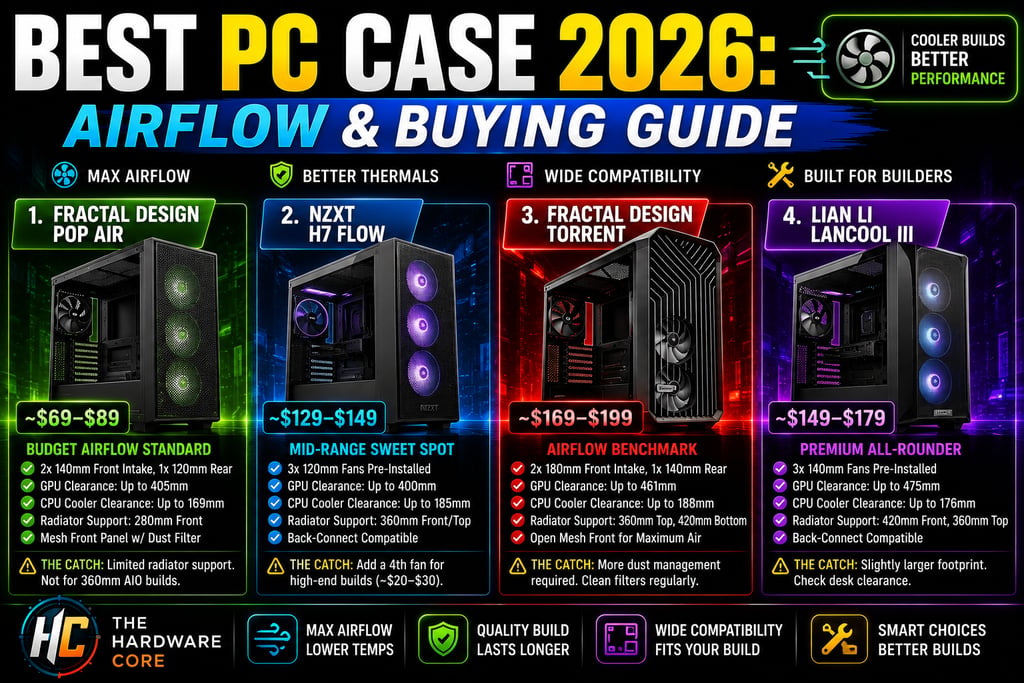
Fractal Design Pop Air: The Budget Airflow Standard
Price: ~$69–$89
Form Factor: ATX mid-tower
Front Panel: Mesh with dust filter
Included Fans: Two 140mm front intake, one 120mm rear exhaust
GPU Clearance: Up to 405mm
CPU Cooler Clearance: Up to 169mm
Radiator Support: 280mm front, 120mm top, 120mm rear
Why Buy It: Ships ready to run without buying additional fans. The two 140mm front intakes create genuinely strong positive pressure that keeps GPU temperatures in check on mid-range builds. Clean cable management channels behind the tray keep the interior tidy without fighting the layout.
The Catch: Radiator support is limited compared to pricier options. Not the pick for a 360mm AIO build.
NZXT H7 Flow: The Mid-Range Sweet Spot
Price: ~$129–$149
Form Factor: ATX mid-tower
Front Panel: Perforated mesh
Included Fans: Three 120mm fans pre-installed
GPU Clearance: Up to 400mm
CPU Cooler Clearance: Up to 185mm
Radiator Support: 360mm front, 360mm top, 120mm rear
Back-Connect Compatible: Yes
Why Buy It: The H7 Flow hits every major compatibility checkbox for a modern high-performance build. Full 360mm radiator support both front and top, back-connect motherboard compatibility, and enough CPU cooler clearance for every air cooler on the market. The perforated mesh front delivers strong airflow while keeping a clean exterior that doesn't scream "server rack."
The Catch: Three 120mm fans is a reasonable starting point, but a high-end build benefits from adding a fourth fan. Budget around twenty to thirty dollars extra if you're pairing this with a flagship GPU.
Fractal Design Torrent: The Airflow Benchmark
Price: ~$169–$199
Form Factor: ATX mid-tower
Front Panel: Open mesh with integrated fan mount
Included Fans: Two 180mm front intake, one 140mm rear exhaust
GPU Clearance: Up to 461mm
CPU Cooler Clearance: Up to 188mm
Radiator Support: 360mm top, 420mm bottom
Why Buy It: The Torrent is the most tested, most benchmarked airflow case of the past two years and it consistently delivers the best thermals in the segment. The two 180mm front fans move substantially more air at equivalent noise levels than three 120mm fans can. GamersNexus thermal data shows the Torrent keeping CPU temperatures within three to five degrees Celsius of an open test bench, which is the practical ceiling for a closed chassis.
The Catch: The open mesh design means more dust management. The included dust filter helps, but expect to clean it more frequently than a partially enclosed design requires.
Lian Li Lancool III: The Premium All-Rounder
Price: ~$149–$179
Form Factor: ATX mid-tower
Front Panel: Mesh
Included Fans: Three 140mm fans pre-installed
GPU Clearance: Up to 475mm
CPU Cooler Clearance: Up to 176mm
Radiator Support: 420mm front, 360mm top
Back-Connect Compatible: Yes
Why Buy It: The Lancool III makes a strong argument for the best all-rounder at this price tier. Front 420mm radiator support is unusual at this price point and useful for builders running large AIO units. The three 140mm fans deliver strong baseline airflow out of the box. Interior layout is genuinely well thought out, with a dedicated GPU brace slot for heavy triple-fan cards and clean cable routing paths that make long builds less painful.
The Catch: Slightly larger footprint than the H7 Flow. Verify desk clearance if you're in a tight workspace.
Should You Buy It?
Airflow first, aesthetics second. Every case in this guide delivers both, which is exactly what the market in 2026 makes possible.
For a budget build on the Fractal Pop Air or Montech AIR 903 tier, you get solid airflow and component compatibility without wasting budget on a case. For a high-end build where a 360mm AIO or a flagship GPU is part of the picture, the NZXT H7 Flow or Lian Li Lancool III gives you the clearance and mounting options to actually run that hardware properly.
Don't buy a glass-front aesthetic box and then wonder why temperatures are high. The case is part of your cooling system.
Our current top case pick, along with the rest of our vetted lineup, lives on the Gear We Recommend page.
Connect
Stay updated with the latest hardware insights
Contact
Subscribe
contact@Thehardwarecore.com
© 2026. All rights reserved.
THE BASEMENT

